
TASK 1
Design
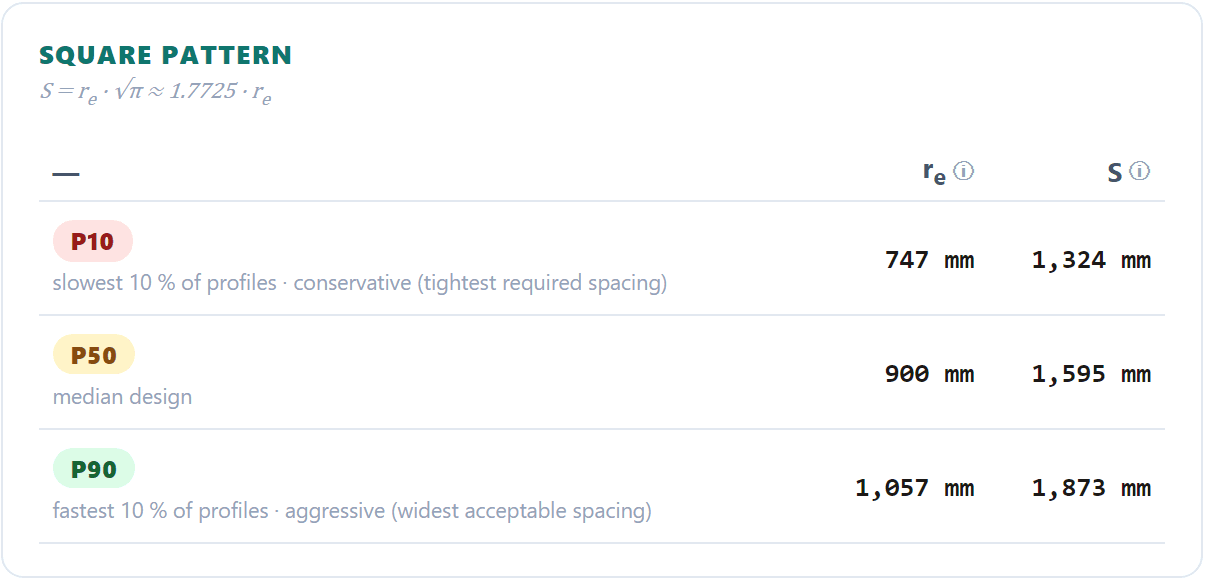
Give a target degree of consolidation and a date. The tool searches the radius of influence and returns the spacing that meets it, for square and triangular patterns.
Prefabricated vertical drains

Design, simulate and back-analyse prefabricated vertical drains for the layered profile you actually have — and get a P10–P90 band you can defend, not one false-precision number.
A unit-cell? solver resolved in radius and depth, in your browser, beside the software you already use. Once built, calibrate it against your settlement plates and piezometers.
See a real report first — the worked Design example (PDF, 11 pages) →Sign-up opens with the public launch. Early-access accounts are set up by hand, with the example projects and the full user guide.
Slide 1 of 3 · The unit cell and a design result
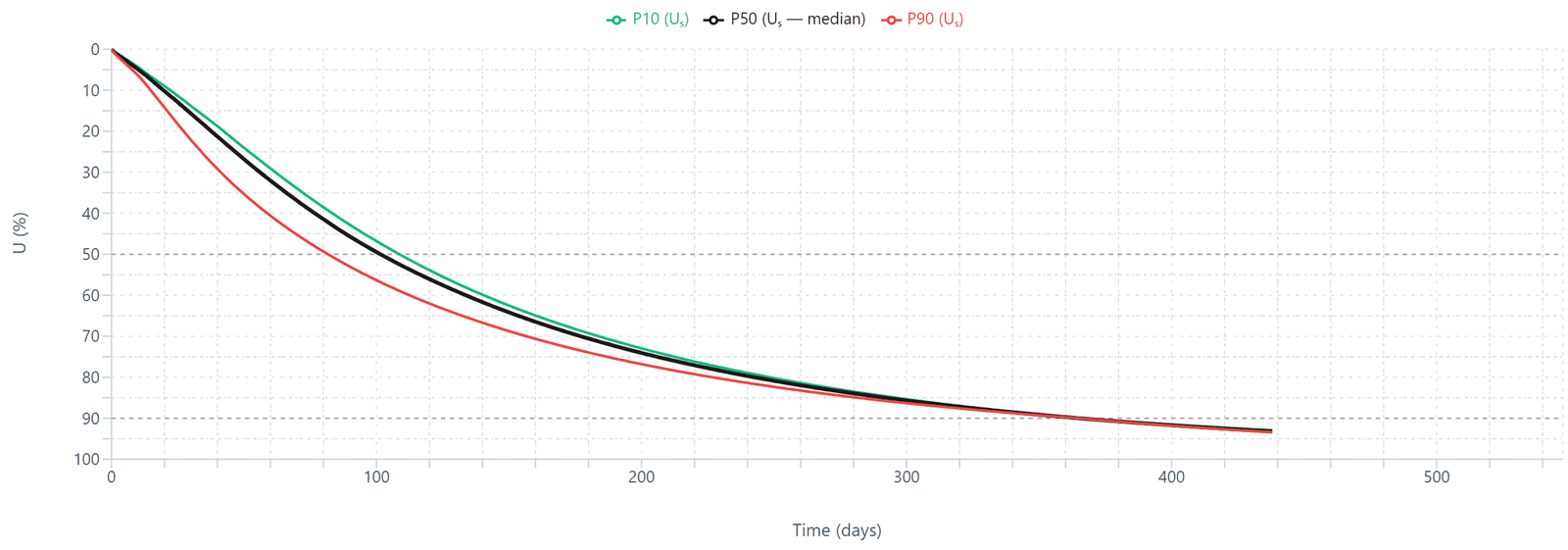
Us = 90 % at t = 365 d
One run of the worked Design example. The sampling seed travels in the project file, so opening it and pressing Calculate returns these same three numbers.
What it does not do. PVDCal solves consolidation in the unit cell around one drain. It does not assess slope or embankment stability, lateral spreading and deformation, or ground outside the treated area. Those remain separate analyses. The full list of limits.
01 — One soil model, three questions
The same solver runs in three directions, so a design and the back-analysis that later checks it share one set of physics.
TASK 1
Give a target degree of consolidation and a date. The tool searches the radius of influence and returns the spacing that meets it, for square and triangular patterns.
TASK 2
Give a spacing. The tool returns settlement and degree of consolidation against time, with the effective-stress profile and the compression path behind them.
TASK 3
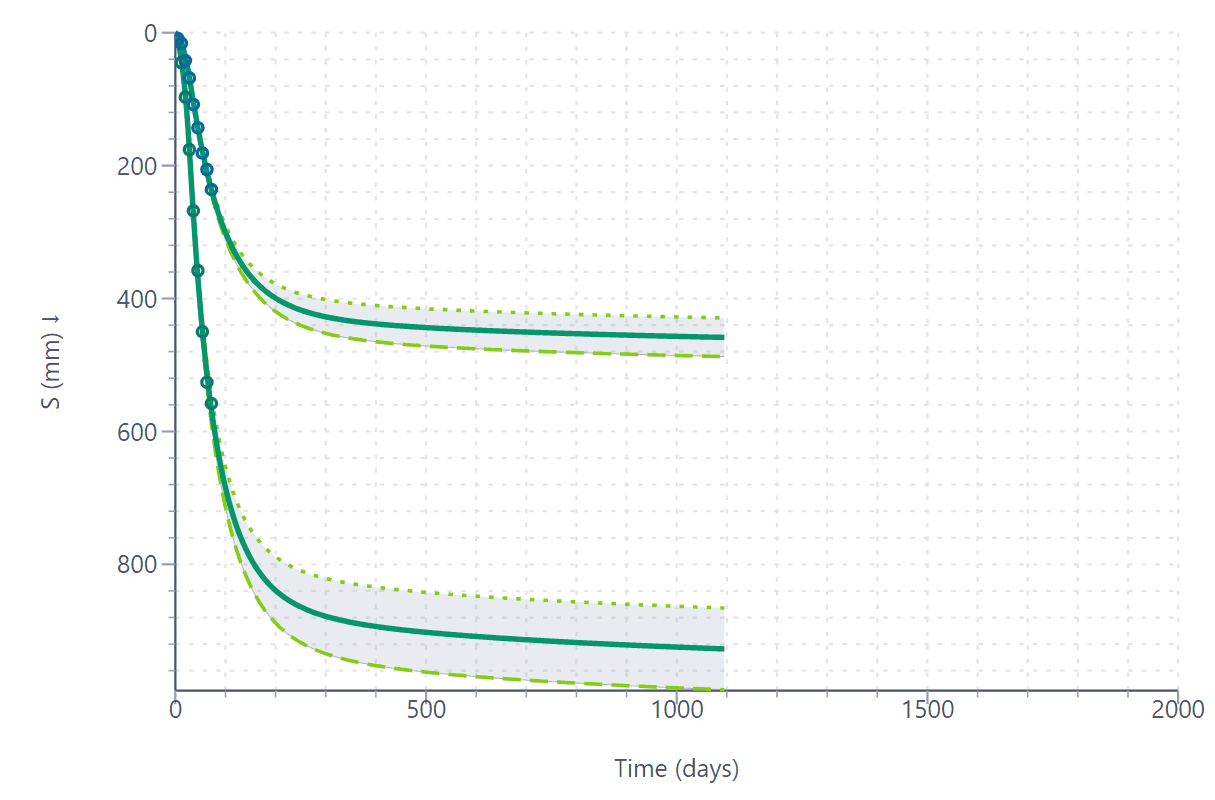
Give settlement plate and piezometer records. The tool calibrates the ground parameters that explain them, then forecasts the rest with a credible range.
02 — Video demo
Two minutes, recorded in the application: the example project is opened, the target is typed, Calculate is pressed, and the spacing, the consolidation curve and the run summary are read. Nothing is staged.
The demonstration film was recorded with fresh random profile draws rather than a saved seed, so on-screen numbers differ slightly from take to take while a saved project reproduces its numbers exactly. The worked example in the user guide is the reference set.
No sound track; the captions are part of the picture. Download the film (MP4, 8 MB).
03 — Real ground, not a chart
Charts assume one uniform layer, instantaneous loading and a constant coefficient of consolidation. Ground obliges none of that, so PVDCal carries each complication explicitly — and cites where it comes from.
Every layer keeps its own compression indices, preconsolidation pressure, void ratio and permeability. Flux continuity is enforced at each interface.
The disturbed annulus and the transition to intact soil are meshed explicitly, with mesh faces landing exactly on the zone boundaries.
Suction enters as a wall value on the drain, with depth loss, and adds to the embankment schedule rather than replacing it.
Drains that stop short of the base are modelled as they are: the untreated layer keeps draining vertically, with a full-disk core below the tip.
Ramps, rest periods and multi-stage construction, with unload and reload following a recompression path rather than the virgin line.
Secondary compression through the Cα/Cc ratio, and a consolidation coefficient that follows effective stress instead of staying constant.
The compression index is blended across the yielding zone rather than stepped at the preconsolidation pressure, because a natural deposit does not yield all at once.
Play consolidation through the programme as an animated map of radius against depth, slice it at any depth or radius, and export it as an animation for your report.
04 — Where it fits
Three ways to size a drain field. PVDCal takes the part the chart treats most coarsely and the finite-element model treats most expensively: the drain system itself.
CHART = design chart or spreadsheet · FE = full finite-element model
PVDCal
Any number of layers, each with its own parameters
CHART
One uniform layer
FE
Any number of layers
PVDCal
Smear and transition zones meshed explicitly
CHART
A single permeability ratio
FE
Modelled, if you build it
PVDCal
Staged, ramped, unload and reload, vacuum
CHART
Instantaneous
FE
Staged, if you build it
PVDCal
Follows effective stress and void ratio
CHART
Constant
FE
Depends on the constitutive model chosen
PVDCal
A P10 / P50 / P90 band from the parameter ranges
CHART
One number, read off a curve
FE
One number per run; bands need many runs
PVDCal
Back-analysis of plates and piezometers, then a forecast
CHART
None
FE
Manual trial and error
PVDCal
About a minute per design; a back-analysis in under half an hour
CHART
Minutes
FE
Hours to days, including the model build
PVDCal
Not covered — by design
CHART
Not covered
FE
Stability, lateral movement, structures
Outside the treated area — differential settlement, stability, structures — the other tools remain the right ones. How the division of labour works →
05 — Back-analysis and forecast
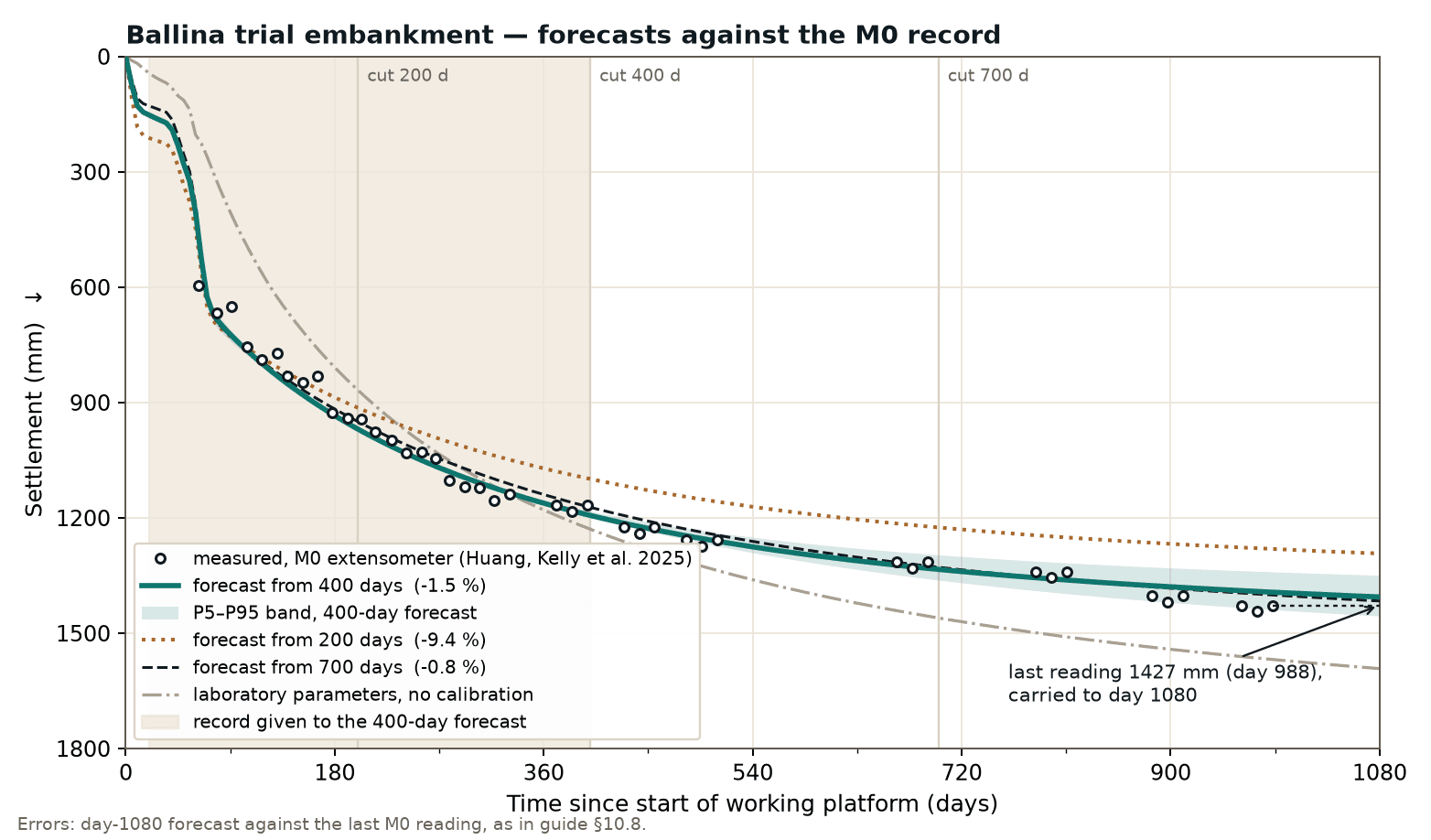
Feed in settlement plates and piezometers. PVDCal searches the parameter space for the soil that explains the record, reports how well it fits, and forecasts the remaining settlement with a credible range.
On the Ballina trial embankment in New South Wales — a published full-scale test on soft estuarine clay — the forecast from a 400-day record landed within 1.5 % of the final measured settlement, and within 0.8 % from a 700-day record.
06 — Who builds it
PVDCal is written and maintained by a practising geotechnical engineer and researcher whose work on the consolidation of PVD-improved clay is published in the peer-reviewed literature. GeotechLogic is a small software business in Victoria, Australia.
PVDCal is opening soon. Ask for early access and we will set you up with the example projects and the full user guide.